






















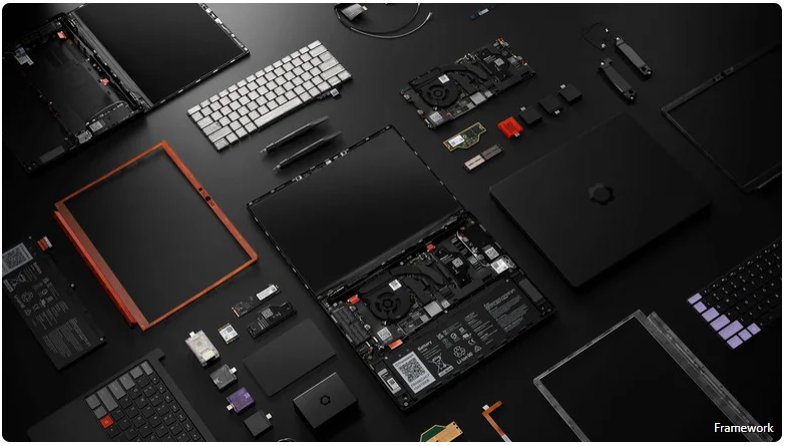
Framework – the brand famous for its highly upgradeable and modular laptops – has just announced a delay in shipping its latest flagship model to address manufacturing defects.
Framework recently notified pre-order customers that it is pushing back the launch of its flagship Laptop 13 Pro by a month. The company explained that it discovered technical issues with both the haptic touchpad and the custom display, prompting it to halt mass production to fix the flaws.
Consequently, hardware shipments have been rescheduled from late June to late July, with some later orders likely rolling into August. Framework assured buyers that it does not expect further deadlines to slip and anticipates being completely back on track by September. The company emphasized that this delay ensures the final hardware is as “robust and reliable as it can be.” However, if pre-order customers prefer not to wait, Framework is offering full refunds upon cancellation.
Technical Details of the Issues
Framework transparently detailed the specific engineering mishaps that led to the production halt:
- Haptic Touchpad: A flaw in the printed circuit board (PCB) design was causing unwanted grounding, requiring a complete redesign of the module.
- Custom Display: A firmware bug was detected that needed to be patched and thoroughly tested before mass production could resume.
On the bright side, thanks to Framework's modular design, orders that do not include the new haptic touchpad or display are completely unaffected. The company expects to ship its mainboards equipped with Intel's new Core Ultra Series 3 chips, as well as other replacement and repair modules, right on schedule.
RAM Configuration Adjustments Amid Market Shortages
Alongside the delay announcement, Framework is offering pre-order customers a flexible solution regarding memory configurations.
In response to customer feedback highlighting how difficult it is to purchase the new LPCAMM2 memory standard from third-party retailers (due to the ongoing global RAM shortage), Framework is allowing buyers to add or tweak RAM choices within their existing orders. This ensures that customers who originally planned to buy barebone DIY editions and source their own RAM won't be left with a functional laptop they can't boot up.
[Buying Guide] Best Mesh Wi-Fi Systems of 2026: Whole-Home Coverage Solutions
If your Wi-Fi constantly drops or slows down when you move to another room, the issue likely isn't your internet plan—it’s your traditional router being overworked. Unlike basic range extenders, which slash your bandwidth and offer a frustrating user experience, a Mesh Wi-Fi system uses multiple nodes to create a single, seamless network that intelligently balances traffic and eliminates dead zones.
Based on rigorous real-world testing, these are the best mesh Wi-Fi systems worth considering in 2026.
1. TP-Link Deco AXE5400 (Deco XE75) – Best Mesh Wi-Fi System for Most People
Key Specifications:
- Wireless Bands: 3 (Tri-band)
- Max Speed Rating: Up to 2,402 Mbps (6GHz band)
- Ethernet Ports: 3 per node
- Coverage Area: Up to 7,200 sq. ft.
+-----------------------------------------------------------------+
| PROS                             | CONS                         |
|----------------------------------|------------------------------|
| * Excellent all-around performance| * App design lacks polish    |
| * Easy to set up and manage      | * Short included power cables|
| * Great value for the money      |                              |
+-----------------------------------------------------------------+
The TP-Link Deco XE75 perfectly balances raw power with user-friendliness. This tri-band system delivers stellar speeds and consistent coverage, making it an ideal choice for larger homes with plenty of thick walls.
Brand Security Note: Addressing late-2024 US national security inquiries regarding its Chinese-owned parent company, TP-Link Systems stated that it is “no longer affiliated with China-based TP-Link Technologies.” The company stated its routers comply with all regional security standards, the Chinese government has no data access or design control, and they continue to cooperate with US agencies to verify their security practices.
2. Google Nest Wi-Fi Pro 6E – Best for Novice Users
Key Specifications:
- Wireless Bands: 3 (Tri-band)
- Max Speed Rating: Up to 2,402 Mbps (6GHz band)
- Ethernet Ports: 2 per node
- Coverage Area: Up to 6,600 sq. ft.
+-----------------------------------------------------------------+
| PROS                             | CONS                         |
|----------------------------------|------------------------------|
| * Super simple "plug & play" setup| * Lacks advanced customization|
| * Relatively affordable          |   features for power users   |
| * Seamless Google ecosystem      |                              |
+-----------------------------------------------------------------+
The Nest Wi-Fi Pro is built for a hands-off, “set it and forget it” experience. Setting up a reliable tri-band network takes just a few taps in the Google Home app, keeping everyday 4K streaming and web browsing incredibly smooth. It integrates seamlessly with Google Assistant, natively supports smart home protocols like Matter and Thread, and receives regular, automatic background security updates.
3. ASUS ZenWiFi Pro AXE11000 (ET12) – Best for Power Users and Gamers
Key Specifications:
- Wireless Bands: 3 (Tri-band)
- Max Speed Rating: Up to 4,804 Mbps (6GHz band)
- Ethernet Ports: Includes high-speed 2.5 Gbps ports
- Coverage Area: Up to 3,000 sq. ft.
+-----------------------------------------------------------------+
| PROS                             | CONS                         |
|----------------------------------|------------------------------|
| * Incredible throughput & speed  | * Highly expensive           |
| * Proprietary AiMesh scaling     | * Interface can be complex   |
|   ecosystem                      |   for casual users           |
+-----------------------------------------------------------------+
The ASUS ZenWiFi Pro ET12 is a heavy-duty, enterprise-grade piece of hardware. Featuring high-performance 2.5 Gbps Ethernet ports, it is tailor-made for multiplayer gaming, intensive data backups to local Network Attached Storage (NAS) drives, or managing medium-sized home offices. Furthermore, ASUS's AiMesh technology allows you to seamlessly loop traditional, high-powered standalone ASUS routers into your existing mesh network to scale up coverage.
What to Look for When Buying a Mesh System
- Wi-Fi 6E is the Sweet Spot: Wi-Fi 6E utilizes the ultra-wide 6GHz radio frequency spectrum alongside the standard 2.4GHz and 5GHz bands. Think of the 6GHz band as an empty, newly built highway—it bypasses local airwave congestion to deliver maximum speeds to modern devices.
- Do You Need Wi-Fi 7 Yet? In short: No. Wi-Fi 7 hardware is currently extremely expensive, and almost none of your current household devices (phones, tablets, laptops) have the chipsets required to exploit its flagship benefits. A reliable Wi-Fi 6E mesh setup will effortlessly handle your internet needs for at least the next 5 years.
- Understand Backhaul: This is the invisible channel nodes use to communicate with one another. Premium systems feature a dedicated Wireless Backhaul (using a separate band entirely for node-to-node chatter), ensuring your main device bandwidth remains un-throttled. If your house is wired, using physical Ethernet cables (Wired Backhaul) to link nodes yields the absolute highest speeds and stability.
- Placement Rules of Thumb: Try to position your nodes no more than two rooms away from each other. Place them at waist-height on open furniture rather than stuffing them into entertainment centers or behind TVs, as physical obstructions heavily degrade wireless radio signals.
















Si te encuentras quieres saber donde rentar motos marinas en la isla de Tenerife, hay muchas propuestas atractivas tanto en el sur de la isla como en diferentes zonas como Costa Adeje y este animado lugar. Lograras conseguir alquiler moto de agua Tenerife sur con tarifas convenientes y tours como jet bike safari o aqua safari que unen intensidad y escenarios asombrosos. Para propuestas mas detalladas, tambien se puede encontrar la chance de rentar motos de agua en Tenerife Los Gigantes o experimentar experiencias acuaticas en el Puerto Colon. Para mas informacion sobre fechas disponibles y valores, te animo a visitar [url=https://alquilerjetskitf.com]+34 612 345 678[/url] .
Del mismo modo, Tenerife brinda alternativas para todo tipo de niveles, desde los que comienzan hasta avanzados, con companias como Jet Hub Tenerife y Adrenalina Jet que llevan a cabo tours en motos marinas y jet ski safaris en destinos como Costa Adeje. Si quieres una aventura total y sin riesgos, contempla las excursiones motos de agua Tenerife sur o en diferentes puntos, y no dejes de lado que asegurar con tiempo siempre ayuda, en especial en temporada alta. Por si lo requieres, el telefono +34 612 345 678 resulta practico para consultas rapidas.
If you find yourself discovering your personal color range, methods like a skin color chart or a skin undertone test camera can be very useful in determining whether you fall into a vivid summer, muted winter, or even a light olive skin tone. [url=https://test-color-analysis.top]what colors look best on me[/url] I’ve seen that attempting a zero-cost color analysis test or running an AI color analysis no-cost app can give quick information into what hues look ideal on an individual and respond to questions like “which season am I” or “which colors work for me” For users curious about the sixteen season color analysis, quizzes and evaluations can determine your particular color set, whether it’s a intense summer palette or a subtle summer color palette, guiding you find your color palette with certainty.
If you’re using paid services like Color Analysis Pro but hope to know how to cancel color analysis pro or the most effective way to cancel the membership, there are clear steps and recommendations online to bypass issues. To get more details into these subjects and uncover more about dark winter color palette or subtle winter palette variations, browse this page: . Whether you’re unsure about “what’s my color palette” or require information on tone analysis, these options and platforms offer a strong jumping-off point!
Did anybody out there had a hard time to fix certain Suno artifacts in their artificially created tracks? [url=https://fixsunovocals.top]clean suno ai track[/url] I discovered that Suno’s AI artifacts can significantly affect the general audio output, primarily with voices coming across as artificial. To tackle this, I began applying a removal tool to clean such AI music files and easily eliminate sound issues from these Suno outputs, which works to upgrade both the overall sound and definition.
For those in need of a quick means to improve any Suno audio quality concerns, there are various zero-cost audio cleaners and specialized cleaners listed online that can function as a Suno audio cleaner or voice cleaner. These utilities function as an advanced artifact remover and can work to render these vocals sound genuine. If you’d like to explore them, listed here is a practical tool that offers an free AI audio cleaner and can aid in Suno mastering and refining your sound quality effortlessly.
If you’ve ever been working with Suno AI crafted tracks, you most likely spotted those bothersome distortions that can substantially degrade the sound quality. [url=https://cleanaitrack.top]suno mastering[/url] Fortunately, there are some useful ways to eliminate Suno flaws using options like the Suno artifact tool or Suno audio enhancer, which enable you to fix Suno AI glitches and improve the full sound. These alternatives are highly valuable if you are looking to clean Suno AI tracks and make voices appear more authentic.
For those trying to fix Suno overall quality or boost Suno music clarity, AI-powered audio tools can be a total godsend. You can find no-cost AI music fixer options that allow you to remove artifacts from Suno tracks and even streamline mastering your tracks digitally. If you’re curious, explore this tool featuring a excellent option to fix Suno audio and enhance your audio without much hassle.
If you’re exploring the universe of colour theory and questioning “what is my color palette,” there are amazing instruments out there like zero-cost color analysis evaluations and apps that help you identify your natural undertones and most flattering season. [url=https://quiz-color-analysis.top]whats my color palette[/url] Whether you fall towards a light winter, deep summer, or even deep winter color palette, knowing skin tone charts and taking a skin color tone test can make all the difference in identifying colors that beautifully enhance you. For a more detailed strategy, the 16 season color analysis approach is remarkably complete, and you can use a 16 seasonal color analysis survey online for specific results.
If you’ve been using Color Analysis Pro and choose to cancel your service, or simply curious about how to oversee your account, there are straightforward steps to execute to cancel color analysis pro effortlessly. Furthermore, if you hope to dive further into areas like fair olive complexion, red undertone skin, or fair olive skin color tables, many platforms provide in-depth info and examples. For further assistance with finding your color palette or understanding skin tone theory, you can explore more .
Hey everyone! [url=https://directflightdeals.top]самые дешевые авиабилеты из москвы за границу[/url] I’m a uni student on a pretty constrained budget, and I’ll be departing from Brussels for the holidays shortly. I’ve been trying to locate consistently cheap flights but get overwhelmed with all the sites and apps out there, and honestly, I’m not sure which ones are consistent for long-term use. I recently came across a newsletter that sends out great flight deals, which looks encouraging but I wanted to hear from others — what tools or tips do you use to track or snag cheap flights departing from Brussels? I’m open to suggestions that help me save without spending hours searching. Also happy to mention any good deals I find along the way. Appreciate it for any advice you can share! Here’s the link to the newsletter I mentioned if anyone wants to take a look.
Hi friends, I thought I’d share a heads-up from my most recent experience flying out of Amsterdam on what felt like a really bargain ticket. After purchasing, I was taken aback to see added charges for checked baggage and even seat selection added to my final bill. These charges were not clearly mentioned during booking, and I only found out about them when I received my receipts and airline policies later on [url=https://cheapflightsfinder.top]cheap flights from geneva[/url] . It’s infuriating because what looks like a good price ends up costing quite a bit more. If you’re flying from Amsterdam on economy airlines, I’d recommend double-checking their baggage and seating fees early on to avoid unwelcome surprises. Has anyone found helpful strategies to spot or avoid these invisible costs? Would like to hear your advice.